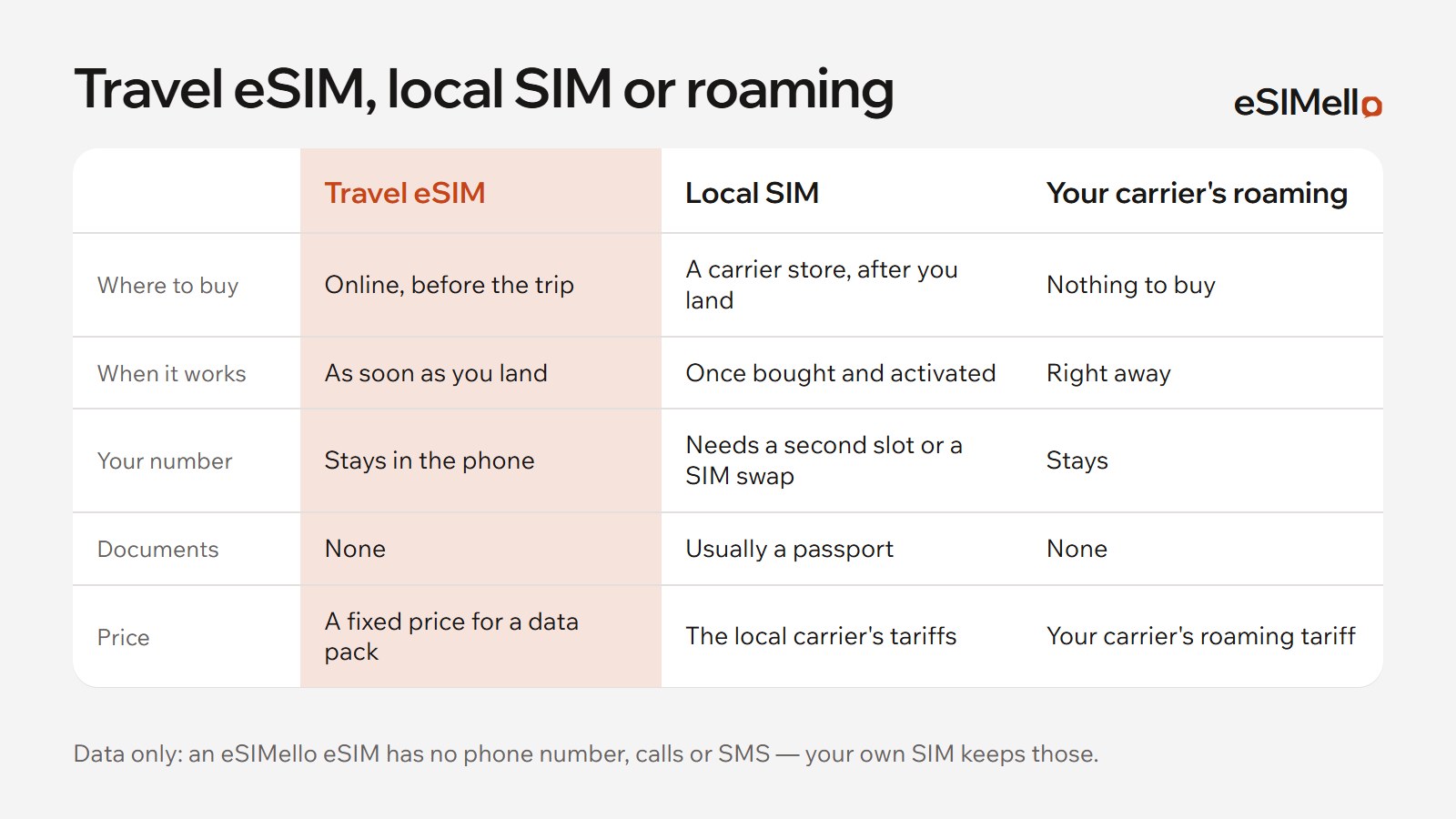
In China you can stay online with your home carrier's roaming or with a travel eSIM installed before you fly. Here is how our China eSIMs work, and one thing to check before you go.

Our China plans
- Networks: China Mobile, China Telecom and China Unicom, all with 5G. Each plan's card lists the networks it uses.
- Where the traffic reaches the internet: in Hong Kong or Singapore, depending on the plan, so websites see an IP address from there. The plan's card says which.
- Two kinds of plan: a pack of data for the whole validity, or an allowance for each day. Each plan's card says what speed you get once a day's allowance is used.
- When the validity starts: for almost every plan, when your phone first connects to a network in China, not when you buy or install the eSIM. Start using it within 180 days of buying it.
- Running low? Top the same eSIM up in My eSIMs, on plans that take a top-up.
Check the apps you rely on before you go
Some foreign websites and apps don't open on networks in China. Before the trip, find out which of the services you rely on, for maps, messages and payments, work there, and set up what you need while you are still at home.
Hong Kong, Macau, Japan or Korea on the same trip?
- China, Hong Kong & Macau plans cover all three. Their traffic reaches the internet in Singapore.
- China, Japan & South Korea plans cover those three countries. Their traffic reaches the internet in Hong Kong.

Before you fly, and after you land
- Check that your phone supports eSIM, in our list of devices. Most iPhones sold in mainland China don't.
- Buy a plan and install the eSIM at home, on Wi‑Fi: step-by-step guides for iPhone and Android.
- After landing, turn on the eSIM's line, choose it for mobile data and turn on data roaming for it. Abroad, a travel eSIM connects through roaming, at no cost beyond your plan.
- Keep data roaming off for your own SIM, so your home carrier doesn't charge you.
If it doesn't connect, see what to check when an eSIM is stuck on “Activating”. A travel eSIM is data only: keep your own SIM on for calls and texts.